
Supplier contacts and bulk audits
1782216319096
Supplier contacts released: 22 June 2026
Bulk audits released: 29 June 2026
One of the main challenges of supply chain management and compliance is keeping information up-to-date. We are now launching two new features to make this much simpler:
Bulk audits: Send audits, surveys and assessments to a group of suppliers or even all suppliers in one go.
Contact lists: Create and manage contact information per supplier and per production unit in Qarma. Use audits and surveys to collect and have your suppliers maintain the information with no manual work on your side.
Bulk audits – automate collection of data
Having to manage a base of hundreds of suppliers is a huge task. Qarma’s audits can be used for surveys, self-assessments and data collection for both onboarding and maintenance of supplier information and documents.
With the Bulk audits feature, you can now send audits to all your suppliers or a group of suppliers in one go, saving a lot of time and eliminating manual errors. And with the new Contact list feature (details below) you can manage who should receive those audits in Qarma.
Check the video for a walk-through of the new feature
Note that the bulk audits is released on the Qarma beta site (read the update notice on the beta site here).
Contact lists – easily capture and manage information
Background – what are contacts useful for?
To use Qarma as your main system of record for supplier information, it is great to have a contact list that can easily be updated. But the real value comes when you activate the contacts for automation in Qarma:
Request inspection booking dates
Send automated weekly inspection schedules to suppliers
Assign audits, surveys and assessments using Bulk audits (see below)
How do I collect contact information and keep it updated?
Like any other data point for suppliers and production units, you can add contact lists to your checklists and have your supplier update the information along with the rest of this data. This is convenient both for initial onboarding and for regular updates (read more in this support article).
How do I manage contacts?
On both the supplier and the production unit pages you will find a section with supplier contacts like this:
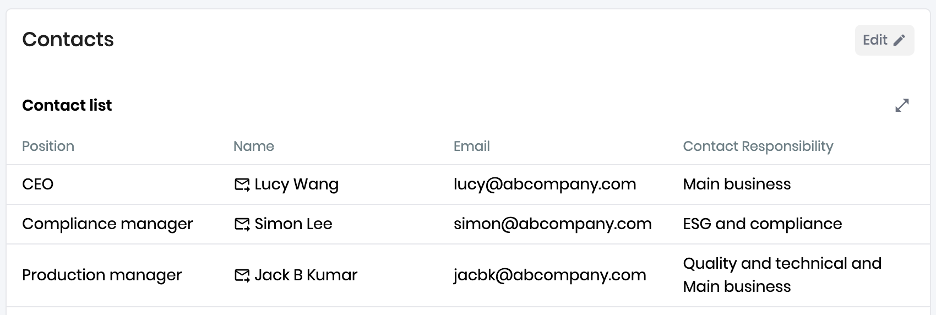
Click Edit to add new contacts, edit existing information, or remove old contacts. Different information can be entered about contacts, such as Position, Name, Email (required) and Responsibility.
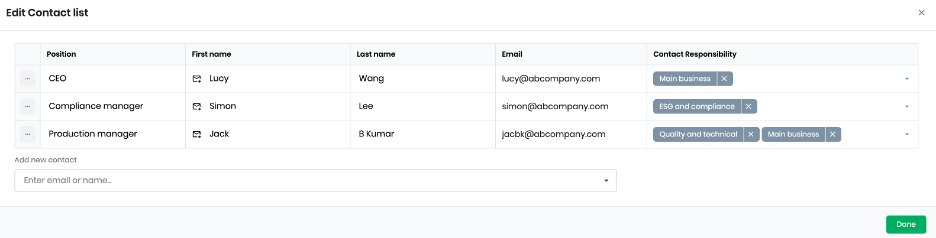
If you would like to capture other data for contacts (phone number, Wechat contact, seniority etc) please contact Qarma Support and this can easily be added.
The Contact responsibility is important, because this is where you decide how the contact will be used for automations in Qarma. For example, if you have an ESG and compliance responsible, you can select this role as assigned user when bulk creating audits. Similarly, the Inspection booking contact is the one to receive booking request emails.
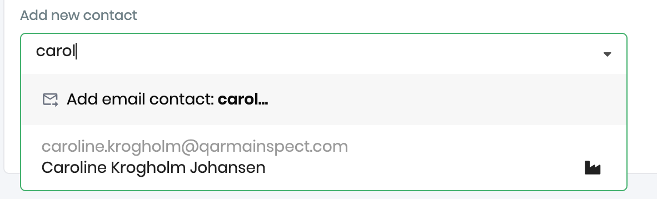
When in edit mode, you can add new contacts by typing in their email address. If the contact is already a user in Qarma, it will show up as a suggestion:
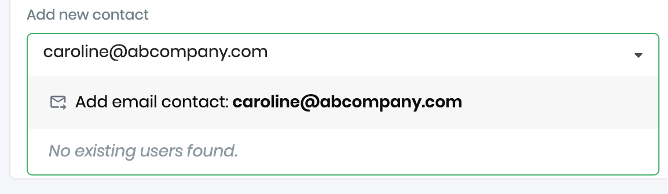
It’s also possible to add contacts that do not have a Qarma user account:
Are contacts and users the same?
No: Users have access to Qarma – contacts do not. But a contact can also be a user. You can see if a contact is also a user by the icon next to the name:
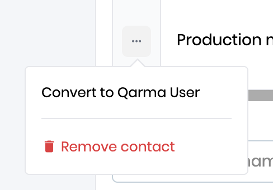
If you would like this contact to be a user in Qarma, click the three dots at the left for each contact and select Convert to Qarma User.
On the User management page you can also now see if a user has a responsibility for a supplier:
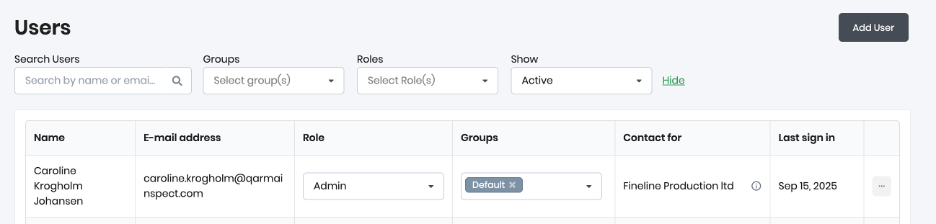
Clicking the small ⓘ icon allows you to jump to the supplier / production unit page to manage the contact.
Contacts do not have to be users for them to receive audits.
Special notes for quality customers using booking contacts
The Users list on the supplier page has now been replaced by the Contact list which also includes a link to the general user management list.
Any users that were previously Contact person used for booking and inspection schedule notification emails have automatically been converted to contacts.
No action needed.
Did you like this update?


Leave your name and email so that we can reply to you (both fields are optional):
